
SENS motion® Webapp 3.10 - Release Notes
What’s New in 3.10#
- Overhauled Export Window – Improved flexibility for data export
- Duplicate Participants – Quickly create a new participant from an existing one
- Sensor On/Off from Participant View – Toggle a participant’s sensor without leaving the overview
- Faster Participant Setup – Add another participant with the same settings right after submitting
- Smarter Bulk Actions – Edit timezone, measurement method, and sensor status for multiple participants at once
- Updated Project Creation – Set default timezone, measurement method, and questionnaires when creating a project
- Sensor Details Improvements – See which participant each sensor is attached to at a glance
- Customisable Date Format – Choose how dates are displayed throughout the app
- Stronger Password Guidance – Live checkmarks show which password requirements are met
- Clearer Export Options – Choose to reuse or regenerate an existing export file
- Easier Navigation – User Settings now takes you back to where you came from
- ErgoConnect Group Code Access – View the group code directly from a single button
- Cleaner Permissions – Admin-only actions are hidden from users without the right access level
Export Window Overhaul#
New Feature: The export window has been redesigned to give you a clearer, more logical set of options when exporting your data.
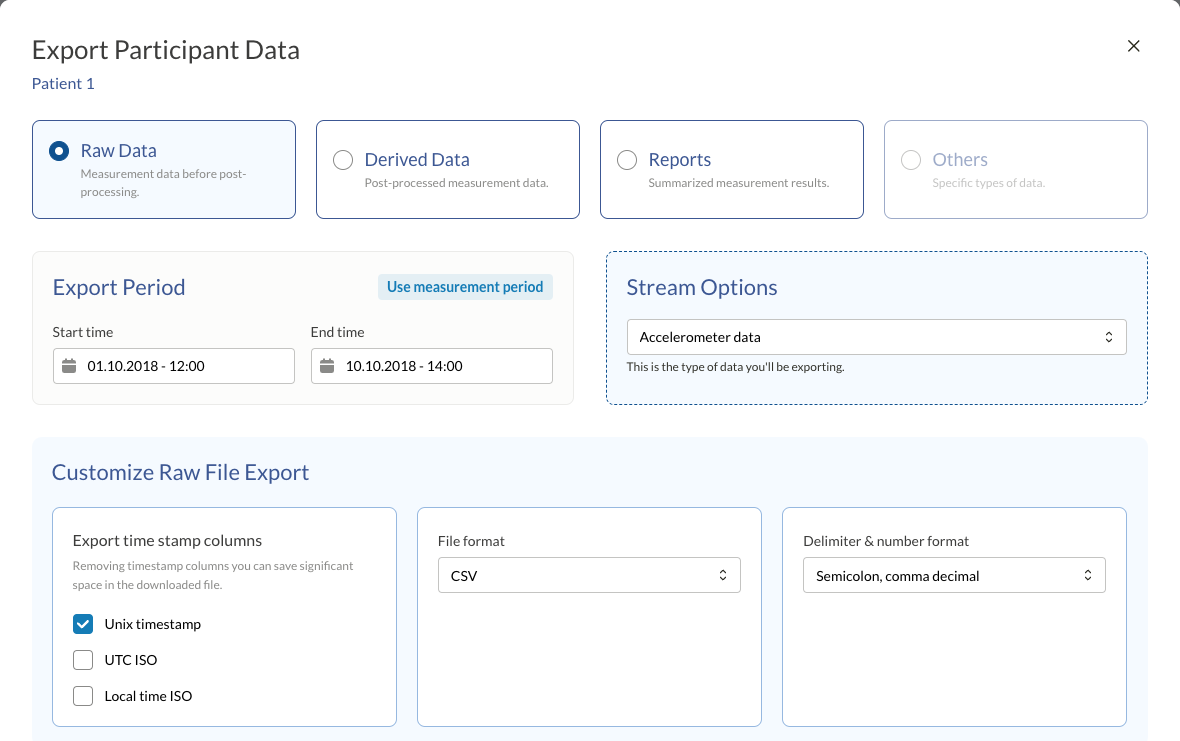
What you need to know: Instead of a single set of export buttons, you’ll now choose your export period first, followed by format options — including summary method, file format, and timestamp format. The available options are tailored to your project type, so SENS, NFA, DEMOS and ErgoConnect projects each show the export variant relevant to them.
Exports are no longer limited by a fixed number of days. Instead, the limit is based on the estimated file size of the download. This gives you more flexibility: by choosing lighter data options, you can export more days at once.
How to use it: Open the export menu as usual and step through the new period and format selections. If the export you want is too large, choose a lighter data option to include a longer period in a single download.
Participant Management Improvements#
Duplicate Participants#
New Feature: You can now duplicate an existing participant directly from the participant list.
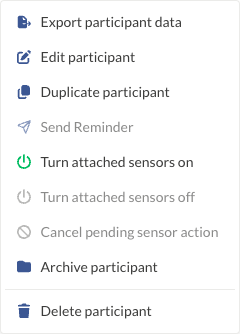
What you need to know: Duplicating a participant opens a new participant form pre-filled with the original participant’s details, so you can review and adjust before saving. This is especially handy when setting up several similar participants in a row.
How to use it: From the participant overview, open the row options menu for the participant you want to copy and select Duplicate. Review the pre-filled details in the new participant form, make any changes needed, and save to create the new participant.
Sensor On/Off from the Participant View#
New Feature: You can now turn a participant’s attached sensor on or off directly from the participant overview.
What you need to know: Previously this required navigating to the sensor tab. Now it’s available as an action right on the participant row, saving you a few clicks when you just need to toggle a sensor.
How to use it: From the participant overview, open the row’s actions menu and select the on/off option for the attached sensor.
Faster Participant Setup#
New Feature: After submitting a new participant, you can now immediately open a new participant form with the same settings.

What you need to know: The new form is pre-filled with the same measurement algorithm and time period as the participant you just submitted, so you don’t have to re-enter the same information when adding several similar participants.
How to use it: Before saving a new participant, check the Keep adding more box next to the Cancel and Save buttons. After you save, a new form will open with the algorithm and period already filled in from your last submission.
Smarter Bulk Actions#
New Feature: Bulk actions in the participant overview now support more than exporting.
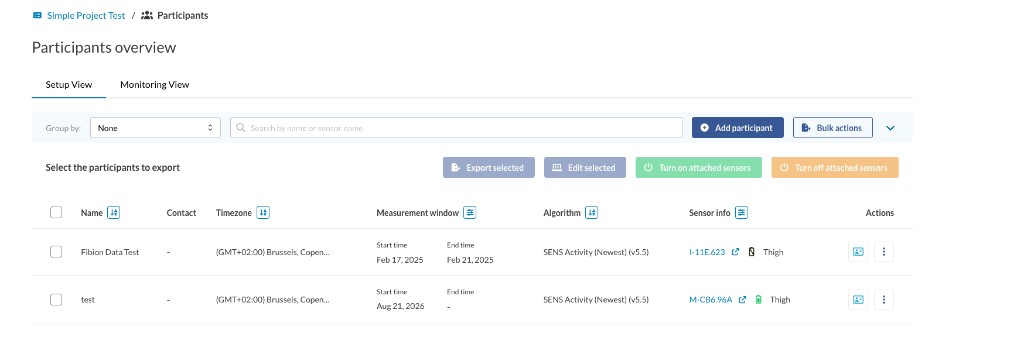
What you need to know: Alongside bulk export, you can now select multiple participants and:
- Edit their timezone, measurement method, and start/end time all at once
- Turn their attached sensors on or off in bulk
How to use it: Click Bulk actions in the participant overview toolbar and select the participants you want to update. Then choose Edit selected, Turn on attached sensors or Turn off attached sensors. Bulk export is still available under Export selected.
Project Creation Improvements#
New Feature: Creating a project now gives you more control over the defaults new participants will use.
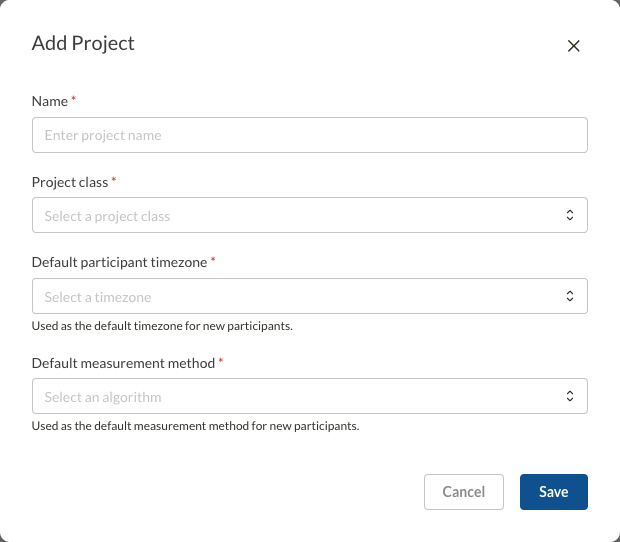
What you need to know: When creating a project, you can now set a default timezone and default measurement method that new participants in that project will use automatically. For supported project types, you can also configure onboarding and end-of-study questionnaires directly in the project settings.
How to use it: When creating or editing a project, look for the new timezone, measurement method, and questionnaire fields in the project settings.
Sensor Details Improvements#
New Feature: The sensor details page now shows which participant each sensor is currently attached to.
What you need to know: This gives you a quicker way to check sensor assignments without cross-referencing the participant list.
How to use it: Check the attached participant field alongside each sensor in the sensor details page.
Account Improvements#
Customisable Date Format#
New Feature: You can now choose your preferred date format in User Settings.
What you need to know: Choose between formats such as DD.MM.YYYY, MM/DD/YYYY, and YYYY-MM-DD. Once selected, your chosen format is applied consistently throughout the app.
How to use it: Go to User Settings and select your preferred date format from the new option.
Stronger Password Guidance#
New Feature: When creating a new password, you’ll now see the password requirements with live checkmarks.
What you need to know: As you type, each requirement updates in real time to show whether it’s been met, making it easier to create a valid password on the first try.
How to use it: Start typing your new password — the checklist below the field will update automatically as your password meets each requirement.
Smaller Improvements#
Clearer Export Options#
What you need to know: When exporting a file you’ve already generated, you’ll now be asked whether to use the existing file or regenerate it with the latest data — useful if you suspect new data has come in since the file was last created.
Easier Navigation#
What you need to know: User Settings now takes you back to the page you came from, instead of leaving you to use your browser’s back button.
ErgoConnect: Group Code Access#
What you need to know: The group code button in ErgoConnect now opens the full group code view directly, with a larger, easier-to-read code.
Cleaner Permissions#
What you need to know: Users without admin-level access no longer see admin-only actions, such as creating a project or moving a sensor, keeping the interface simpler for everyone else.
Bug Fixes#
We’ve also fixed the Move Sensor feature, which was previously not working correctly, along with a number of other smaller reported issues.
Summary#
Version 3.10 focuses on making everyday participant and project management faster and more flexible. The overhauled export window gives you clearer control over your data exports, while duplicate participants, quick sensor toggling, and smarter bulk actions cut down on repetitive setup work. Project creation now supports useful defaults and questionnaires, and account improvements like customisable date formats and live password guidance round out the release.
We hope these improvements make your work with the SENS platform more productive. As always, we welcome your feedback and suggestions for future releases.